OpenStreetMap
Products used: OpenStreetMap
This dataset is external to the Digital Earth Africa platform.
Background
OpenStreetMap is a free and open geographic database, providing location information of roads, buildings, and landmarks. It is built, maintained and supported by a world-wide geospatial community.
OpenStreetMap data is licensed under the Open Data Commons Open Database License (ODbL) by the OpenStreetMap Foundation (OSMF). It is free to copy, distribute, transmit and adapt the data, providing credit to OpenStreetMap and its contributors. Full licence information and attribution guidelines can be found at the OpenStreetMap’s Copyright and License page.
Description
This notebook will demonstrate how to access OpenStreetMap data using Python package `osmnx <https://osmnx.readthedocs.io/en/stable/osmnx.html>`__.
Getting started
To run this analysis, run all the cells in the notebook, starting with the “Load packages” cell.
Load packages
Import Python packages that are used for the analysis.
[1]:
import osmnx as ox
import geopandas as gpd
By default, osmnx will cache the query response so it doesn’t have to call the API repeatedly for the same request. Accessing the cache is efficient when refining an analysis or when a user’s main area of interest if fixed. The users should, however, be aware that the cached files will take up storage space.
Whether to use the cache and where to store the cached data can be configured. In this example, we will set the cache to be stored in a temporary folder that is cleared when a user logs out of the Sandbox. This may not be necessary for some users.
[2]:
ox.settings.cache_folder='/tmp/cache/'
Analysis parameters
This section defines the analysis parameters, including:
central_lat, central_lon, buffer: center lat/lon and analysis window size for the area of interest
The default location is in Johannesburg, South Africa.
The OpenStreetMap API provides a few different ways to define location. While methods using address or place name are convenient to use, they depend on geocoding and are more likely to yield ambiguous location matches. If place name is used, the osmnx.geocode_to_gdf() function can be used to check whether a location name yields the correct place boundary. For combined analysis with DEAfrica datasets, query using bounding box or polygon is preferred.
When using bounding box to query, note the order of bounds are “north, south, east, west”.
[3]:
# Set the central latitude and longitude.
central_lat = -26.2041
central_lon = 28.0473

# Set the buffer to load around the central coordinates.
buffer = 0.05

# Compute the bounding box for the study area.
xmin, xmax = central_lon - buffer, central_lon + buffer
ymin, ymax = central_lat - buffer, central_lat + buffer

bbox = (xmin, ymin, xmax, ymax)
Retrieve building geometries from OpenStreetMap
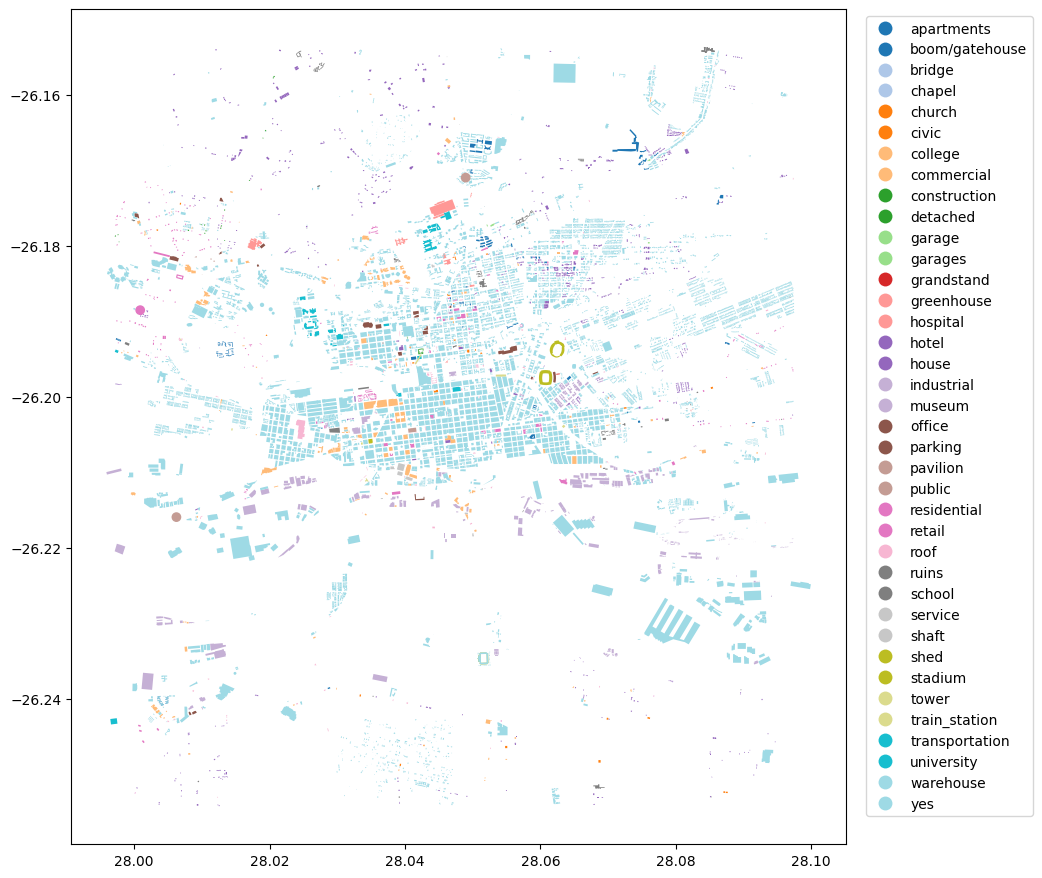
Different types of geometries can be queried by defining the tags parameter. For example, tags={'building': True} would return all building footprints in the area.
Using the location and tags, geometries will be retrieved from OpenStreetMap and the results are returned as a Geopandas GeoDataFrame.
[4]:
# tags for buildings
tags = {'building': True}
[5]:
geometries = ox.features.features_from_bbox(bbox=bbox, tags=tags)
[6]:
#print the first few rows
geometries.head()
[6]:
| geometry | building | name | addr:city | addr:housenumber | addr:postcode | addr:street | building:levels | phone | website | ... | service_times | noexit | capacity | end_year | house | bench | bin | lit | type | operator:short | ||
|---|---|---|---|---|---|---|---|---|---|---|---|---|---|---|---|---|---|---|---|---|---|---|
| element | id | |||||||||||||||||||||
| node | 618018755 | POINT (28.00625 -26.21595) | public | Langlaagte Testing Grounds | NaN | NaN | NaN | NaN | NaN | NaN | NaN | ... | NaN | NaN | NaN | NaN | NaN | NaN | NaN | NaN | NaN | NaN |
| 739768208 | POINT (28.04897 -26.17096) | public | Astotech Conference Centre | NaN | NaN | NaN | NaN | NaN | NaN | NaN | ... | NaN | NaN | NaN | NaN | NaN | NaN | NaN | NaN | NaN | NaN | |
| 3656191305 | POINT (28.00091 -26.18852) | residential | Society of Jesus (Jesuits) | Auckland Park | 15 | 2092 | Molesey Avenue | 1 | +27 11 482 4237 | https://sj.org.za/ | ... | NaN | NaN | NaN | NaN | NaN | NaN | NaN | NaN | NaN | NaN | |
| relation | 952160 | POLYGON ((28.05994 -26.19668, 28.06013 -26.196... | stadium | NaN | NaN | NaN | NaN | NaN | NaN | NaN | NaN | ... | NaN | NaN | NaN | NaN | NaN | NaN | NaN | NaN | multipolygon | NaN |
| 2609571 | POLYGON ((28.05811 -26.18412, 28.05811 -26.184... | yes | NaN | NaN | NaN | NaN | NaN | NaN | NaN | NaN | ... | NaN | NaN | NaN | NaN | NaN | NaN | NaN | NaN | multipolygon | NaN |
5 rows × 146 columns
[7]:
#visualize the geometries retrieved
geometries.plot(figsize=(10,12), cmap='tab20', column='building', legend=True, legend_kwds={'bbox_to_anchor':(1.25,1)});
Retrieve road geometries from OpenStreetMap
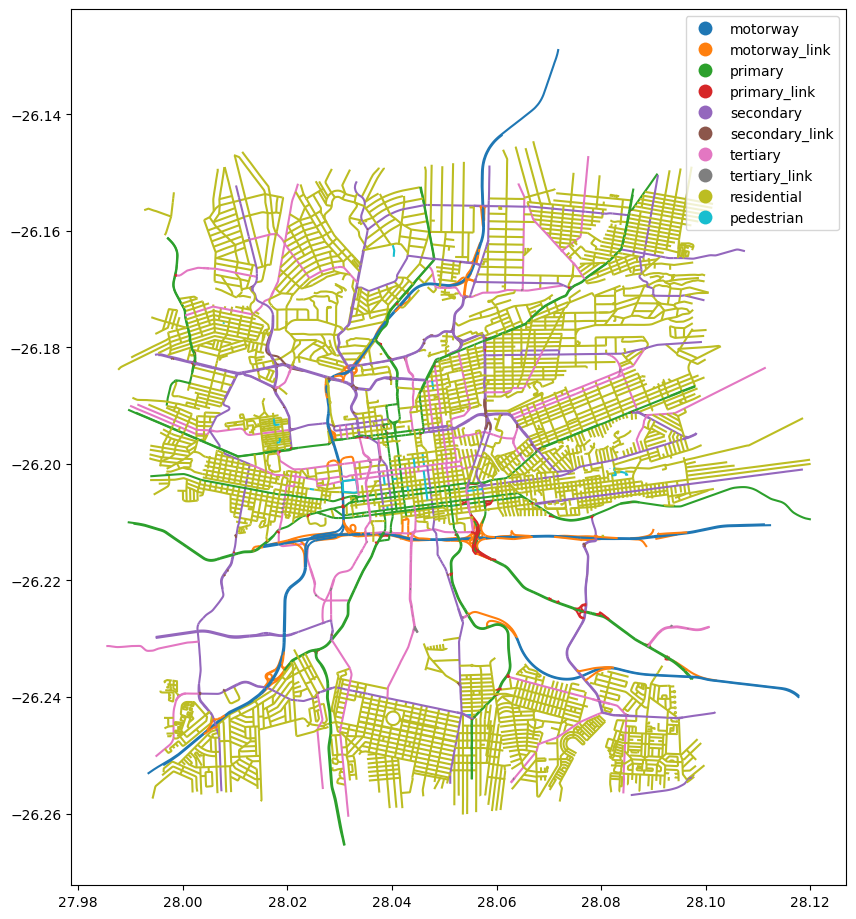
Road networks can be retrieved using the highway tag. A list of tag values can be used to select specific types of geometries.
Tag values for highway and their descriptions can be found at https://wiki.openstreetmap.org/wiki/OpenStreetMap_Carto/Lines
[8]:
# selected types of roads
tags = {'highway': ['motorway', 'motorway_link', 'primary', 'primary_link',
                    'secondary', 'secondary_link', 'tertiary', 'tertiary_link',
                    'residential', 'pedestrian']}
[9]:
#noting the order of the bounds provided
geometries = ox.features.features_from_bbox(bbox=bbox, tags=tags)
[10]:
#print the first few rows
geometries.head()
[10]:
| geometry | highway | ref | junction:ref | crossing | name | direction | destination:ref:to | bicycle | name:en | ... | minspeed | maxspeed:forward | cycleway:left | bridge:ref | area | cycleway:right | bus:lanes:backward | covered | handrail | placement | ||
|---|---|---|---|---|---|---|---|---|---|---|---|---|---|---|---|---|---|---|---|---|---|---|
| element | id | |||||||||||||||||||||
| way | 4334924 | LINESTRING (28.05643 -26.20387, 28.05627 -26.2... | primary | R24 | NaN | NaN | Commissioner Street | NaN | NaN | NaN | NaN | ... | NaN | NaN | NaN | NaN | NaN | NaN | NaN | NaN | NaN | NaN |
| 4339731 | LINESTRING (28.01733 -26.21239, 28.01707 -26.2... | primary | R41 | NaN | NaN | Main Reef Road | NaN | NaN | NaN | NaN | ... | NaN | NaN | NaN | NaN | NaN | NaN | NaN | NaN | NaN | NaN | |
| 4339842 | LINESTRING (28.08513 -26.19127, 28.08585 -26.1... | primary | R24 | NaN | NaN | Kitchener Avenue | NaN | NaN | NaN | NaN | ... | NaN | NaN | NaN | NaN | NaN | NaN | NaN | NaN | NaN | NaN | |
| 4339844 | LINESTRING (28.05802 -26.20314, 28.05774 -26.2... | primary | R24 | NaN | NaN | Albertina Sisulu Road | NaN | NaN | NaN | NaN | ... | NaN | NaN | NaN | NaN | NaN | NaN | NaN | NaN | NaN | NaN | |
| 4339876 | LINESTRING (28.01748 -26.2122, 28.01759 -26.21... | primary | R41 | NaN | NaN | Main Reef Road | NaN | NaN | NaN | NaN | ... | NaN | NaN | NaN | NaN | NaN | NaN | NaN | NaN | NaN | NaN |
5 rows × 71 columns
[11]:
#visualize the geometries retrieved
geometries.plot(figsize=(10,12), cmap='tab10', column='highway', categorical=True, categories=tags['highway'], legend=True);
Additional information
License: The code in this notebook is licensed under the Apache License, Version 2.0. Digital Earth Africa data is licensed under the Creative Commons by Attribution 4.0 license.
This notebook accesses OpenStreetMap data, therefore when sharing analysis results, attribution should follow guidellines from the OpenStreetMap’s Copyright and License page.
Contact: If you need assistance, please post a question on the Open Data Cube Slack channel or on the GIS Stack Exchange using the open-data-cube tag (you can view previously asked questions here). If you would like to report an issue with this notebook, you can file one on
Github.
Compatible datacube version:
[12]:
import datacube
print(datacube.__version__)
1.8.20
Last Tested:
[13]:
from datetime import datetime
datetime.today().strftime('%Y-%m-%d')
[13]:
'2025-01-13'